Archivalis AI - Files
One program. Everything under one roof.
Order in your files, a narrated film from your photos and a conversation to listen to from your documents. Your personal data stays protected throughout.
- Organize Find duplicate files and sort photos, music and documents automatically.
- Slideshow A short film made from your photos, with a narrator and music.
- Podcast A conversation to listen to, like a radio show – made from your document.
- Privacy Before anything goes to a cloud AI, names and account numbers are replaced. You see exactly what will be sent.
Private, offline, no subscription
-
No telemetry
No telemetry data, no file contents, no folder structures sent to Archivalis AI servers.
-
Runs offline
After setup the program needs no internet – only for what you switch on yourself: cloud AI, Edge voices, location lookup. Duplicates, capture dates, music, preview — all of it is computed on your device.
-
Free download, Pro bought once
Free in the Microsoft Store. Archivalis Pro for the AI features is bought once: no monthly fee, no renewal, and you can try it free for 14 days first.
Organize
Order in photos, music and documents
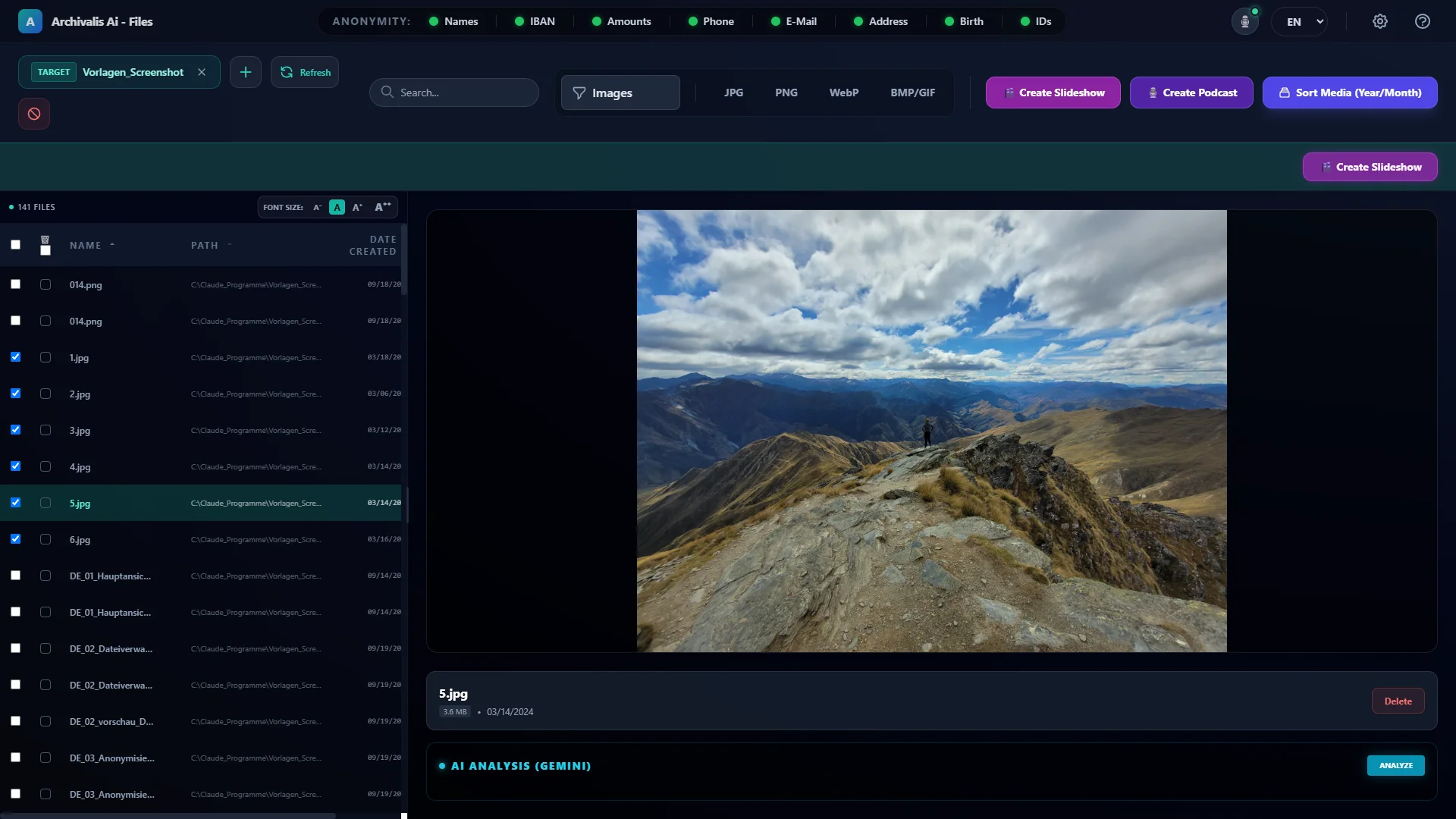
Archivalis brings order to photos, videos, music and documents – by your rules. Before anything is moved, you check every proposal in the review window.
- Duplicate files: finds identical files by their actual content, even under different names. Copies go to a recycle bin – nothing is hard-deleted.
- Photos & videos: sorted by the real capture date into year and month.
- Music: organized by genre, artist and album; the AI fills in missing details (Archivalis Pro).
- Documents: invoices, contracts and letters end up in the right folder, and the AI summarizes long texts at the click of a button (with Archivalis Pro and an AI of your choice).
Slideshow
Turn photos into a narrated film
Pick your photos and videos and Archivalis turns them into a short film: the AI writes the story, a voice tells it, and music plays underneath, automatically lowering while the narrator speaks. Part of Archivalis Pro, free to try for 14 days.
- Pick your pictures and set the order
- Four narration styles: travel, family memories, facts & history, picture description
- A female or male narrator – or your own voice
- Subtitles come along as an SRT file
This is what the result looks like – about a minute of New Zealand, made with Archivalis.
Script to read along
In March 2024 I travelled to New Zealand.
Afterwards I visit the Hobbiton Movie Set in Matamata,
built in 1999 on a working sheep farm for The Lord of the Rings trilogy.
A little further on at Signal Hill in Dunedin,
the 1940 Centennial Memorial incorporates
a historic stone brought from Edinburgh Castle.
Later I reach Lake Wakatipu, where Māori legend says the rhythmic rise
and fall of the water comes from the beating heart of a buried giant.
The next day I explore Ben Lomond,
named by a Scottish shepherd in 1847, rising 1,748 metres high.
Towards evening I stop at Lake Pukaki, where finely ground rock flour
suspended in glacial meltwater creates a unique natural phenomenon.
Podcast
Documents to listen to
From a document – a manual, a report, a technical text – Archivalis creates a conversation between two people. You listen as you would to a radio show instead of reading. The AI script is part of Archivalis Pro; a script you write yourself is voiced for free.
- Choose a document, the AI writes the dialogue – you can still change it before it is voiced
- Two voices – including your own
- Save as MP3
- You can also read the script aloud: two people present the finished dialogue, for example at a presentation or in a school hall – without writing anything themselves. The script can be saved as a text or Markdown file.
Listen to how it sounds. This podcast is also the user manual of Archivalis – made with Archivalis from the manual.
Script to read along
Sarah: Welcome everyone! Today we are diving into Archivalis AI, a comprehensive management application designed to organize, clean up, and analyze your entire file library. I'm Sarah, and joining me is David, who is going to help us break down how all these features work. David, it's great to have you here!
David: Thanks, Sarah! It's great to be here. Archivalis really tackles file management from every angle—whether you are dealing with scattered documents, thousands of unorganized photos, or messy music collections.
Sarah: So David, let's start with the basics. How does Archivalis handle loading and finding files across our drives?
David: Well, Sarah, it starts with adding folders using the main folder button, including network drives. Archivalis scans everything, including subfolders, while automatically skipping hidden files and its own system storage so it never runs into itself. You can also exclude specific folders using the "Ignored Folders" option. Once loaded, you can filter as you type in the search box, narrow things down by category like Documents, Images, Videos, Audio, or Duplicates, and sort by name, size, capture date, or path.
Sarah: That sounds super smooth. And what about previewing items before we make any changes?
David: The preview pane on the right handles images, paginated PDFs, media files with a full transport bar, and text or spreadsheet formats. You can also right-click any document to summarize it, extract text, run custom AI prompts, or rename it with built-in validation to prevent invalid characters or duplicate names.
Sarah: Let's talk about duplicates, David, because I know everyone has extra copies cluttering up their drives. How does the software detect them?
David: That's one of its strongest features, Sarah. It doesn't just rely on file names. Archivalis compares actual file content using SHA-256 checksums. For files over one megabyte, it builds a quick fingerprint from the beginning, middle, and end, combined with the file size. So even if two identical photos have completely different names, it spots them. Then, with Auto Select features like "Keep Oldest," "Keep Newest," or "Keep from Folder," you can mark all extra copies for deletion in a single click.
Sarah: That saves so much manual work! What about organizing media like photos, videos, and music?
David: For photos and videos, Archivalis reads the real capture date—from EXIF metadata for images or the internal structure for videos—and files them neatly into year and month folders. Before anything is moved, a review window shows you every suggested path so you can tweak it by hand, and Archivalis remembers your preferences for next time. It can even resolve place names from GPS coordinates using OpenStreetMap, though that option is off by default for privacy.
Sarah: And for audio files, David? I know music collections can be notoriously chaotic.
David: Exactly, Sarah. When organizing music, it reads existing tags first. Any missing information—like artist, title, album, year, or genre—is filled in by your chosen AI provider, which analyzes the track context to recognize full albums consistently. Each artist gets assigned a single genre so their work isn't scattered. You can customize the track naming scheme, apply changes across entire albums, and write the metadata directly into the files without re-encoding the audio itself. Supported formats include MP3, M4A, FLAC, OGG, Opus, and WMA.
Sarah: That is incredibly thorough. Now, document analysis and AI sorting seem like major highlights here. How do those tools work?
David: For documents—including scanned PDFs processed via text recognition—you can run predefined templates for action items, dates, expense analysis, or custom prompts. When you use AI Sorting, the software reads your existing directory structure and places documents into the best-fitting folder or creates logical subfolders. It even suggests clean, standardized file names like date, sender, and title. If a duplicate name exists, it appends a number or sends redundant file moves to the trash, ensuring nothing gets accidentally overwritten.
Sarah: Privacy is a huge concern whenever cloud AI is involved. David, how does Archivalis protect user data during document processing?
David: They built a very detailed privacy layer, Sarah. There are eight independent filters covering names, IBANs and card numbers, amounts, phone numbers, email addresses, physical addresses, dates and places of birth, and customer or contract IDs. When active, these filters replace sensitive values with numbered placeholders before anything hits a cloud AI model. Once the AI responds, Archivalis restores the actual values locally on your PC. There is also a "Maximum Anonymization" mode that turns on all filters and masks every number, plus a preview button to inspect the exact filtered text before sending. And if you use a local AI model, everything stays entirely on your machine.
Sarah: That brings us to two really creative features: the Podcast Studio and the Slideshow Builder. Tell us about those!
David: The Podcast Studio transforms document insights into natural audio conversations between two speakers, just like what we are doing right now! It features a Vision toggle so local models can examine document page layouts, pictures, and tables. For audio playback, you can choose between Windows offline voices, EdgeTTS online voices, or Chatterbox for high-quality local speech synthesis.
Sarah: And what about creating slideshow videos from our media?
David: Clicking the slideshow option launches a guided six-step wizard. You select your photos and videos, arrange their order, define a topic and narrator perspective, pick background music and voice options, and review the prompt. Archivalis then renders a polished 16:9 full HD video featuring smooth camera motion, titles, transitions, background music, and full spoken narration.
Sarah: It really sounds like a complete toolkit for keeping digital life organized and turning raw files into actionable content. Thanks for breaking it all down so clearly, David!
David: My pleasure, Sarah! It's a fantastic tool to explore.
Privacy
The AI only sees placeholders
You decide which AI works: a local AI on your PC, where nothing leaves your computer, or a cloud AI with your own key. For the cloud AI there is anonymization:
-
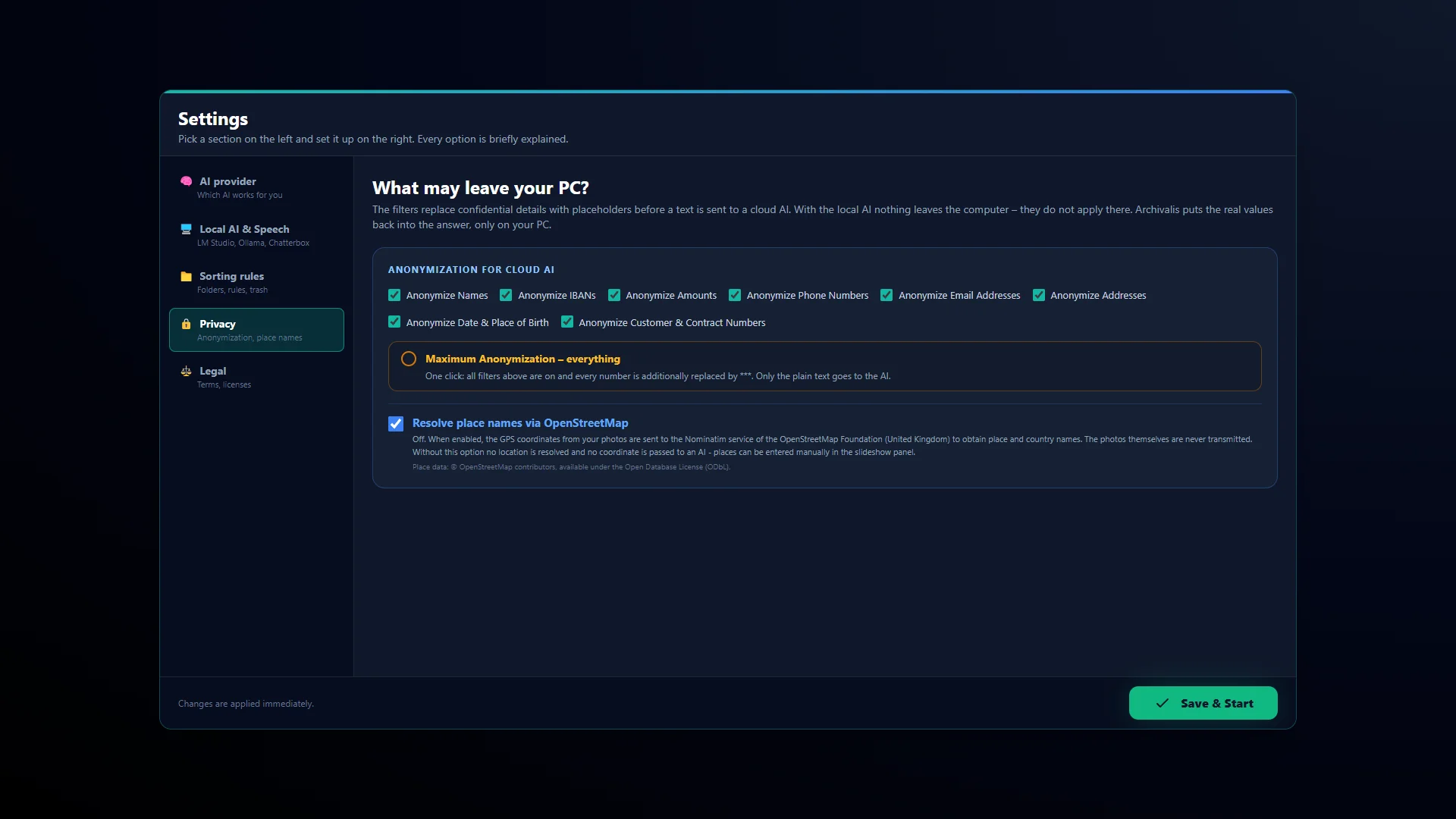
Choose filters
Names, IBANs, amounts, phone numbers, e-mail addresses, addresses, dates of birth and contract numbers – individually or all at once with “Maximum Anonymization”.
-
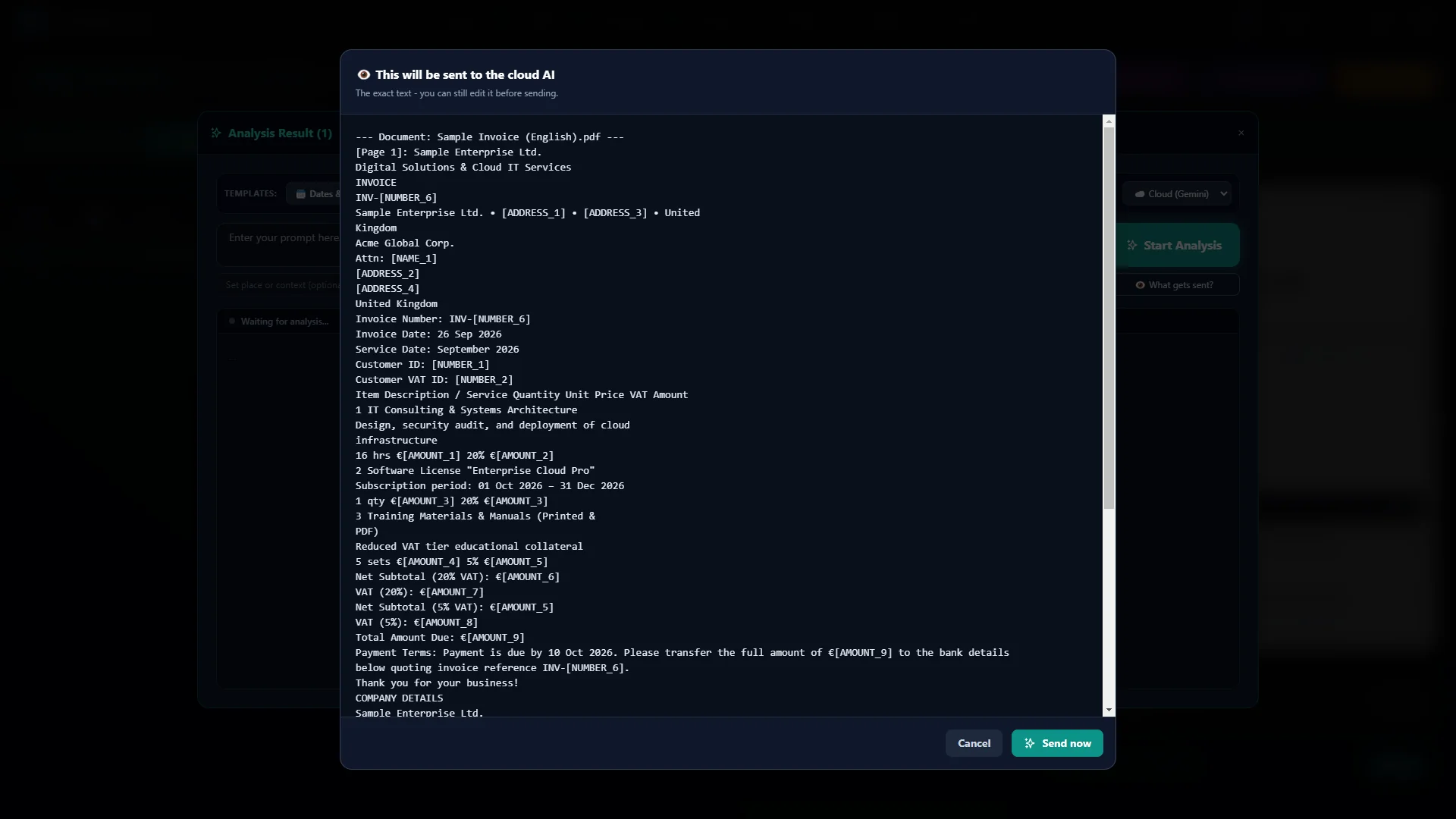
Check and edit first
The window “This will be sent to the cloud AI” shows the exact text. You can still change it before you click “Send now”.
-
What the cloud AI receives
Transfer
- Name
- Mrs [NAME_1]
- IBAN
- [IBAN_1]
- Amount
- [AMOUNT_1]
The AI only sees placeholders
“Mrs Anna Schmidt, IBAN DE89 3704 0044 0532 0130 00, transfers €1,250.00” becomes “Mrs [NAME_1], IBAN [IBAN_1], transfers [AMOUNT_1]”.
-
Back on your PC
Transfer
- Name
- Mrs Anna Schmidt
- IBAN
- DE89 3704 0044 0532 0130 00
- Amount
- €1,250.00
The answer comes back
Archivalis puts the real values back in, only on your PC.
You stay in control: you see and edit every text before it leaves your device.
With a local AI nothing leaves your computer at all. Read more
What you need, and what the program cannot do
System requirements
- Windows 10 or 11 (64-bit), developed and tested on Windows 11.
- 8 GB of RAM (16 GB recommended) and about 1 GB of free disk space for the program.
Free, no AI needed
File list with preview, duplicate search, filing photos and videos by capture date, sorting music by existing tags and file names, renaming, filtering, the recycle folder, podcasts from scripts you write yourself with Windows or Edge voices, and the anonymization preview.
With Archivalis Pro
Filing and naming documents, summaries, deadlines and to-do lists, AI recognition of music details, the narrated slideshow, podcasts from documents, and the local speech output Chatterbox with voice cloning.
Archivalis Pro is a one-time purchase in the Microsoft Store: no subscription, no renewal, and the Store shows the price. You can try every Pro feature free for 14 days first; you start the trial yourself, the first time you open a Pro feature. Afterwards the free features and everything you have created stay with you.
Even with Archivalis Pro you bring the AI yourself: either a local model through LM Studio or Ollama, both free, or your own paid API key from Google, OpenAI or Anthropic. That software is not included, and the program does not come with a key.